
This page is for the iTimekeep mobile application. For information on iTimekeep desktop’s calendar, see Calendar.
The calendar displays your daily, weekly and monthly totals. These totals can be viewed by horizontally scrolling the time totals bar at the top of the screen:
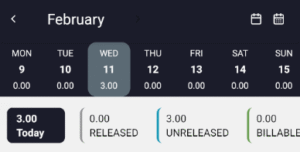
The viewable totals are:
- A total of all work hours entered for the day, week, or month
- Released and unreleased time
- Billable and non-billable time subtotals
- Drafted time
- Time with validation errors
- Accountable time
Note: Accountable time does not display by default and must first be enabled in the iTimekeep Admin Portal by your firm’s administrator.
By default, the calendar displays time entries and totals on a day-by-day basis. To switch to different views, tap the calendar buttons at the top of the screen:
 switches to the week view. The week view provides a time breakdown for the current week.
 switches to the month view. The month view provides a time breakdown for each week of the month.
 switches to the week view. The week view provides a time breakdown for the current week.
 switches to the month view. The month view provides a time breakdown for each week of the month.
The calendar will alert you to scheduled holidays in the day view and week view. In the day view, holidays occurring on the current day are displayed at the top of the time totals. To view all holidays for a current week, tap View on the week view holiday notification to open the holiday sheet.