
The menu is opened by tapping the  button on the navigation bar. The menu displays over the rest of the
application:
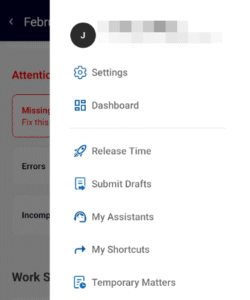
 Settings
- Opens the Settings menu, where you can adjust profile information and application preferences. For more
information, see Settings – Mobile.  Dashboard
- Opens the Dashboard, which consolidates timekeeping information to provide a summary and overview of your work. For more information, see Dashboard.
 Release Time
- Opens the Release Time screen, where you can select from time release presets and release the time to your
firm’s Time and Billing system.  Submit Drafts
- Allows you to bulk submit all time entries in draft status. Tapping Submit Drafts will move you to the My
Time screen.  Missing Time
- Opens the Missing Time screen, where you can view days where the total submitted time entries did not
meet the Daily Goal value set by your firm administrator.  My Assistants
- Opens the My Assistants screen, where you can view and edit the assistants assigned to you. For more information, see My Assistants.
 My Shortcuts
- Opens the My Shortcuts screen, where you can adjust how text shortcuts function in the application. For more information, see My Shortcuts.
 Settings
 Dashboard
 Release Time
 Submit Drafts
 Missing Time
 My Assistants
 My Shortcuts