
My Time is the default screen that iTimekeep opens to upon log in. The My Time screen can be accessed from
anywhere in the application by tapping the  My Time button on the navigation bar.
The My Time screen is comprised of the following elements:
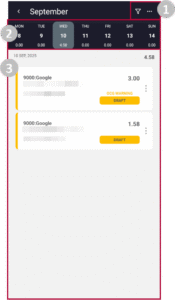
- 1 – Management Options
- Each button contains options for managing time entries:
 opens filtering options, and
 contains the Edit Time Entries option, which allows you to select multiple time entries for mass actions.
 - 2 – Current Week
- Displays the current week and the total time recorded for each day.
- 3 – Time Entries
- Displays the time entries recorded for the day and the total daily time. Tap on the
 icon next to a time entry
to view available actions. - Alternatively, drag the time entry to the left for quick access to the
 Edit Time Entry button, and the
 Delete Time Entry button. You can also delete a time entry by tapping and dragging it all the way to the left of the screen.
 opens filtering options, and
 contains the Edit Time Entries option, which allows you to select multiple time entries for mass actions.
 icon next to a time entry
 Edit Time Entry button, and the
 Delete Time Entry button. You can also delete a time entry by tapping and dragging it all the way to the left of the screen.