
The navigation bar provides access to all the iTimekeep functions that facilitate timekeeping:
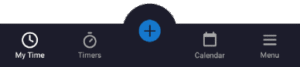
The navigation bar is available from wherever you are in the application and will always have the following buttons available:
 My Time
- Opens the My Time screen, where you can view, sort, filter, edit and action time entries. For more information, see My Time.
 Timers
- Opens the Timers screen, where you can view, sort, filter and edit all active timers, both running and paused. For more information, see Timers.
 Action Button
- Opens the action menu, where you can manually add time, or start a new timer.
 Calendar
- Opens the Calendar screen, which provides a comprehensive view of all your recorded time. For more information, see Mobile Calendar.
 Menu
Menu- Opens the menu, providing access to additional screens, sheets and functions that are accessed less frequently. For more information, see Menu.
 My Time
 Timers
 Action Button
 Calendar
 Menu
Menu